



Microsoft security implementation involves configuring, deploying, and managing Microsoft's security technologies to protect your users, devices, data, and cloud environments. For mid-market organizations, this typically means working with Microsoft 365 security features, Microsoft Defender products, Microsoft Entra ID for identity management, and Microsoft Purview for data protection.
The challenge is that Microsoft offers an extensive set of security capabilities. Many organizations own the licenses but only use a fraction of what's available. Without a structured approach, security configurations can become inconsistent, gaps can go unnoticed, and the value of your investment remains unrealized.
That's where a clear implementation strategy becomes essential. Your team needs to understand which capabilities apply to your environment, how to configure them according to security best practices, and how to validate that controls are working as intended.
Key Takeaways: Microsoft Security Implementation
- Microsoft security implementation requires more than enabling features. It demands a structured approach to configuration, validation, and ongoing management.
- An effective security program connects identity protection, endpoint security, email protection, and data security into a coordinated system.
- DotStar helps organizations build measurable Microsoft security programs through assessments, managed services, and expert guidance.
- Security maturity improves when you establish baselines, track progress, and continuously refine your controls based on real evidence.
- The goal is not to finish security; it's to build a program that keeps improving as threats and business needs evolve.
Why Microsoft Security Requires a Program, Not Just Products
Owning Microsoft security technologies doesn't automatically mean your organization is protected. A security program differs from a collection of security products in several important ways.
Products address specific functions like endpoint protection, email filtering, and identity verification. A program connects those functions into a coordinated system with visibility, accountability, and measurable outcomes. When your security operates as a program, you can answer questions like: Are our controls working effectively? Where do gaps exist? What should we improve next?
Without program-level thinking, security decisions often become reactive. A phishing incident triggers a policy change. An audit request prompts a documentation review. A vendor suggestion leads to a new purchase. Each action may be useful, but without a larger structure, it's difficult to know whether your organization is becoming more secure over time.
How to Assess Your Current Microsoft Security Posture
Before making changes to your Microsoft environment, you need to understand where you stand today. A Microsoft security assessment provides that baseline by reviewing your current configurations against security best practices.
What Should a Security Assessment Look At?
An effective assessment examines several areas:
-
Identity protection includes authentication methods, conditional access policies, and how identity risks are monitored.
-
Endpoint security covers device management, compliance policies, encryption settings, and Defender configurations.
-
Email protection looks at Exchange Online security, anti-phishing controls, and safe attachment policies.
-
Data protection reviews sensitivity labels, data loss prevention rules, and information protection capabilities.
-
Cloud access evaluates application security, external sharing controls, and how your organization manages access to cloud resources.
What Makes a Good Security Assessment?
A useful assessment does more than produce a score or a list of findings. It prioritizes recommendations based on impact and helps you understand which improvements should happen first and why. The goal is to leave with a clear roadmap, not just a collection of technical observations.
The assessment should also be read-only, reviewing your environment without making changes. This allows you to evaluate findings and plan your approach before any modifications occur.
Where to Start Your Microsoft Security Implementation
With dozens of Microsoft security capabilities available, knowing where to begin can feel overwhelming. A practical approach focuses on foundational controls first, then expands based on your organization's risk profile and maturity level.
Identity Protection with Microsoft Entra ID
Identity is often the first target in modern attacks. Microsoft Entra ID (formerly Azure Active Directory) provides identity and access management capabilities that help you verify who is accessing your resources and under what conditions.
Start by ensuring multifactor authentication is required for all users, not just administrators. Then implement conditional access policies that evaluate risk signals before granting access, considering factors like user location, device compliance, and sign-in behavior.
Identity Protection within Entra ID can detect suspicious sign-in patterns and compromised credentials. These capabilities help your security team understand identity-related risks before they result in unauthorized access.
Endpoint Security with Microsoft Defender for Endpoint
Your devices represent one of the largest attack surfaces in your environment. Microsoft Defender for Endpoint provides endpoint detection and response capabilities that go beyond traditional antivirus protection.
Configuration involves deploying Defender to your devices, establishing baseline policies, and tuning detection settings to reduce false positives while maintaining visibility into real threats. Threat and vulnerability management features help identify weaknesses on endpoints before they're exploited.
The value comes not just from detection but from response capabilities, the ability to isolate compromised devices, investigate incidents, and understand how threats move through your environment.
Email Protection with Microsoft Defender for Office 365
Email remains one of the most common attack vectors. Microsoft Defender for Office 365 extends protection beyond basic spam filtering to address sophisticated phishing attacks, business email compromise, and malicious attachments.
Safe Attachments and Safe Links scan content for threats in real time. Anti-phishing policies help detect impersonation attempts targeting your users or executive team. These capabilities work together to reduce the likelihood that malicious content reaches your inbox.
Configuration requires balancing protection with user experience. Policies that are too aggressive may block legitimate communications, while policies that are too permissive may allow threats through.
Building Your Microsoft Security Program
Implementation is the starting point, but building a Microsoft security program requires more than initial configuration. A program includes ongoing monitoring, regular validation, and continuous improvement.
How to Establish a Security Baseline
A baseline documents your current security state and provides a reference point for measuring progress. For Microsoft environments, this often starts with Microsoft Secure Score, a measurement that reflects your security configuration against Microsoft's recommendations.
Your Secure Score is useful as an indicator but shouldn't be treated as the sole measure of security effectiveness. A high score reflects alignment of the configuration with recommendations, not necessarily that your controls are working as intended in practice.
Your baseline should also include documentation of your current policies, configurations, and any known gaps. This becomes the foundation for your improvement roadmap.
What Does Ongoing Security Program Management Look Like?
Security program management involves several ongoing activities. Monitoring tracks security events and identifies potential incidents. Validation confirms that controls are functioning correctly. Reporting communicates security status and progress to stakeholders. Improvement identifies opportunities to strengthen your posture in response to new threats, changing business needs, or gaps revealed by testing.
For many organizations, managing these activities internally is challenging. Limited staff, competing priorities, and the need for specialized expertise can make consistent program management difficult to sustain.
How DotStar Supports Microsoft Security Programs
DotStar helps organizations turn Microsoft security investments into measurable security programs. Rather than providing disconnected services, DotStar's approach focuses on building a coordinated system that improves over time.
The process typically starts with an assessment to establish where your organization stands today. From there, DotStar can help implement recommendations through managed services that cover identity protection, endpoint security, email protection, and cloud security.
Why Continuous Improvement Matters
Security is not a destination. Threats evolve, business needs change, and configurations can drift from their intended state. A security program built for continuous improvement can adapt to these changes rather than becoming outdated.
DotStar's managed security services include regular validation, reporting, and guidance that help organizations track progress and identify the next best improvement. This differs from one-time engagements that leave organizations without ongoing support or visibility.
How to Structure Your Microsoft Security Implementation
A structured implementation follows a logical progression. Start with foundational controls, validate that they're working, then expand to more advanced capabilities based on your organization's readiness and risk profile.
Phase 1: Foundation
Begin with identity protection by enabling multifactor authentication and implementing basic conditional access policies. Deploy endpoint protection across your devices and establish baseline security configurations. These foundational controls address the most common attack vectors.
Phase 2: Expansion
Once foundational controls are in place, expand to email protection, data protection, and cloud access controls. Configure safe attachments, safe links, and anti-phishing policies. Implement sensitivity labels and data loss prevention rules for your most sensitive information.
Phase 3: Maturity
At this stage, focus shifts to detection and response capabilities, threat hunting, and advanced identity protection. Integrate security data into a unified view that helps your team understand threats across your entire environment. Establish processes for incident investigation and response.
How to Measure Security Program Effectiveness
Measuring security effectiveness requires more than tracking incidents or reviewing scores. Effective measurement examines whether controls are working as intended and whether your organization is improving over time.
What Should You Track?
Track metrics that reflect control effectiveness, not just activity. For identity protection, measure how often risky sign-ins are blocked by conditional access rules. For endpoint security, track how quickly vulnerabilities are remediated after discovery. For email protection, monitor the percentage of phishing attempts that are blocked before reaching users.
Progress metrics matter too. How many of your planned improvements have been implemented? How has your security posture changed compared to your baseline? Where have you closed gaps identified in previous assessments?
How to Report Security Status to Leadership
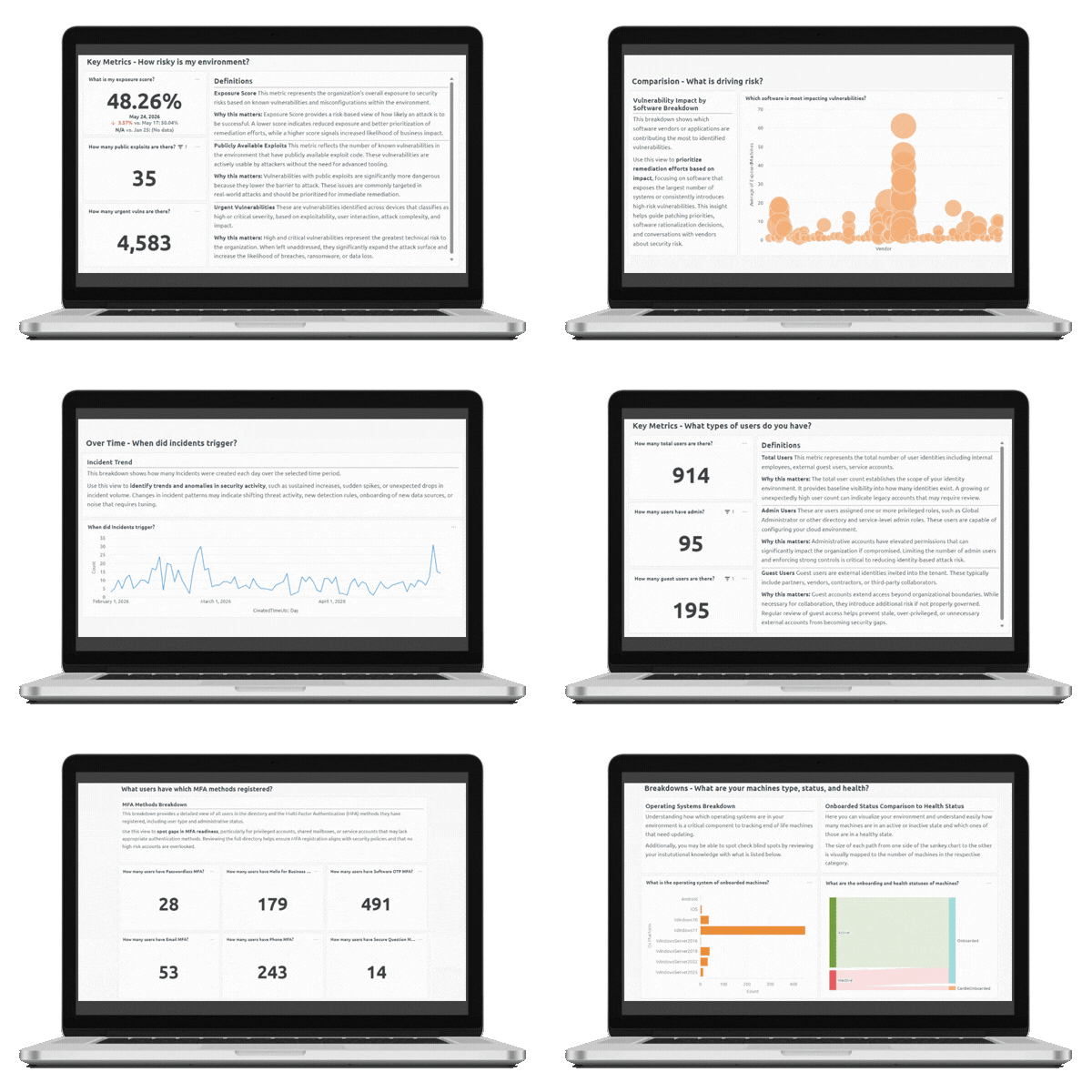
Executive reporting should translate technical security data into business terms. Focus on risk reduction, control effectiveness, and progress toward stated goals. Avoid overwhelming leadership with technical details; instead, highlight what's working, what needs attention, and what resources are required to continue improving.
DotStar's reporting capabilities help organizations communicate security status through executive-ready dashboards that track posture trends, risk visibility, and service performance.
Common Challenges in Microsoft Security Implementation
Organizations frequently encounter similar challenges when implementing Microsoft security. Understanding these challenges helps you prepare and avoid common pitfalls.
Configuration Complexity
Microsoft's security platform is extensive. Configuring it correctly requires understanding how different components interact, which settings to prioritize, and how to tune controls for your specific environment. Without expertise, organizations may enable features without optimizing them, reducing their effectiveness.
Resource Constraints
Security requires ongoing attention. Many small and mid-market organizations lack dedicated security staff or compete with other IT priorities for the same resources. This can lead to security configurations that work initially but degrade over time without regular maintenance.
Visibility Gaps
Even with security features enabled, organizations may lack visibility into whether controls are working. Without monitoring and reporting, gaps can go undetected until an incident occurs.
When to Consider a Managed Security Partner
Managing a Microsoft security program internally makes sense when your organization has dedicated security staff, the expertise to configure and maintain Microsoft security technologies, and the capacity to monitor, validate, and improve your security posture over time.
If those conditions don't fully apply, working with a managed security partner can help fill gaps. A good partner brings expertise in Microsoft security configuration, provides ongoing monitoring and response capabilities, and helps guide your security program toward continuous improvement.
DotStar's managed security services are designed for organizations that want to build a stronger security program without hiring a full internal security team. The focus is on outcomes, measurable improvement in security posture, rather than simply deploying features.
How to Get Started with Microsoft Security Implementation
The starting point depends on where your organization stands today. If you're unsure about your current Microsoft security configuration, an assessment provides clarity. If you know gaps exist and need help addressing them, implementation services can accelerate your progress. If you want ongoing support and visibility, managed services can sustain your security program over time.
What matters most is taking a structured approach rather than making isolated changes without a larger plan. Security improves when you can see where you stand, understand what needs to change, and track whether those changes are making a difference.
Start Building a Security Program That Keeps Improving
Implementing Microsoft security is not a one-time project. Your organization will be better protected when you treat security as an ongoing program that requires structure, measurement, and continuous attention.
Start by understanding your current state through a thorough assessment. Build foundational controls around identity, endpoint, and email protection. Expand to data protection and cloud security as your program matures. Establish processes for monitoring, validation, and improvement that ensure your security posture keeps pace with changing threats.
If your organization needs help building or managing a Microsoft security program, DotStar can help you understand where you stand, prioritize what matters most, and continuously improve your security posture over time.